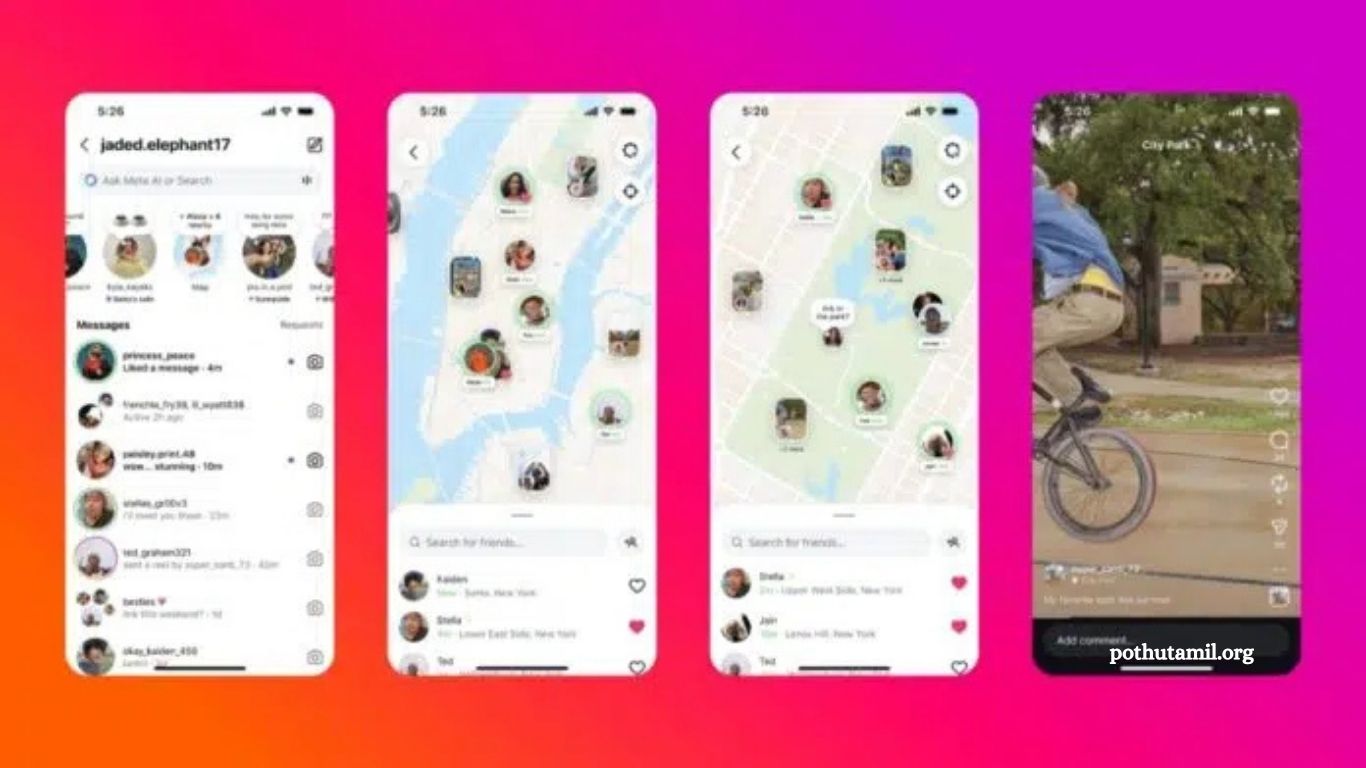
Instagram’s new Map feature allows friends to share their real-time location effortlessly. It’s designed to help users discover nearby events, trending spots, and create content in their area, making social interactions more dynamic and engaging. By default, this feature is turned off for all users, allowing you to decide whether you want to participate. Importantly, Instagram only tracks your location while the app is open or actively running, so it doesn’t monitor you in the background.
The platform also emphasizes privacy by requiring double consent before any location data is shared with others. In this guide, I will walk you through how to enable Instagram’s Map feature safely and provide tips on protecting your privacy while using it.
Read More: Spotify Student Discount India 2025: Step-by-Step Guide to Get It Easily
What Is Instagram’s New Map Feature?
Instagram’s new Map feature works similarly to Snapchat’s Snap Map, letting you share your current location with selected, trusted friends. It also helps you discover nearby places and events through shared content.
The map displays location-based stories, reels, and short posts from friends and creators you follow, making it easier and faster to explore your surroundings.
You can access the map in the Direct Messages section, where a “Map” option appears at the top of your messages. Clicking it opens an interactive map that you can zoom and navigate to see shared locations. Location tags from stories and reels appear automatically, showing where posts were originally recorded.
For privacy, Instagram keeps location sharing off by default. It only activates after double consent in settings, ensuring your location is never shared accidentally. You can adjust these preferences anytime from your account settings to keep your personal data secure.
How to Access and Use Instagram’s New Map Feature
To use Instagram’s Map feature, open the app and go to your Messages page. Tap the new “Map” button at the top. First-time users will see a pop-up explaining privacy: no one can see your location without permission, and settings can be changed anytime.
Once the map opens, choose who can view your location: all friends, close friends, specific people, or no one. Even if you don’t share your location, you can still see others’ shared locations.
To adjust sharing preferences later, go to your profile → three-line menu → Settings → Story, Live & Location → Location Sharing. Here you can update or remove sharing access at any time.
On the map, you’ll see friends’ locations if they share them, along with location-based stories and reels. For example, a friend at a concert posts a story—it appears on the map tagged with that location. Creators can also share restaurants, parks, or local events.
Additionally, you can post Instagram Notes linked to your location. These temporary updates, like “At the park, come join,” appear on the map for selected viewers and disappear automatically, offering a casual way to connect without direct messaging.
Privacy and Safety in Instagram’s New Map Feature
Instagram’s Map feature prioritizes privacy and security. By default, it does not track your location in real time—updates occur only when the app is actively open. This is different from apps that continuously track your location in the background.
The platform uses double consent to ensure sharing is intentional. First, you enable location in the app settings. Second, you confirm sharing before anyone can see it. You can also stop sharing instantly whenever you feel uncomfortable.
Even if location sharing is off, posts with tagged locations remain visible. For example, a story tagged at a café will appear on the map. For safety, Instagram recommends tagging locations after leaving a place, rather than in real time.
You can still explore posts and discover new spots without revealing your location, as friends who share their locations will appear on your map.
Instagram also warns that shared locations can attract public attention. Small cafés or local spots may become crowded after viral exposure, so think carefully before posting.
Ultimately, the Map feature is designed for connection, not constant monitoring. It helps friends plan meetups and explore trending events, but protecting your safety should always come first.
Benefits and Uses of Instagram’s New Map Feature
Instagram’s new Map feature makes social media more interactive and engaging. It encourages real-life meetups through shared posts and location updates. For instance, you can see if friends are nearby for coffee or discover events and activities happening in your area.
Creators and businesses can also benefit. Restaurants, shops, and tourist spots can use the map to attract local visitors, helping small businesses reach new customers more effectively.
Location-based content is more engaging than random posts because it connects digital experiences with real-world places. People feel closer when they know where a moment happened.
The map supports spontaneous plans and last-minute meetups. You can join friends already at a location or leave notes inviting others to join instantly.
Instagram’s Map aligns with global trends in location sharing seen on apps like Snapchat and Apple’s Find My. However, Instagram prioritizes privacy by limiting updates to when the app is active, avoiding continuous tracking.
Users should be mindful of risks. Location sharing can attract strangers or cause overcrowding at popular spots. To stay safe, share your location only with trusted friends, avoid live updates from private spaces, and post public locations after leaving them.
Used wisely, Instagram’s Map strengthens friendships, connects people to local experiences, and makes social media more meaningful every day.
Frequently Asked Questions
What is Instagram’s Map feature?
Instagram’s Map feature lets users share their real-time location with selected friends, discover nearby events, places, and view location-based stories, reels, and posts.
How do I access the Map feature?
Open Instagram, go to Direct Messages, and tap the “Map” button at the top. First-time users will see a privacy pop-up explaining how location sharing works.
Who can see my location?
You can choose to share your location with all friends, close friends, specific people, or no one. You can update these preferences anytime in your settings.
Is my location tracked in the background?
No. Instagram only updates your location when the app is actively open. It does not track your location continuously.
Can I see friends’ locations without sharing mine?
Yes. You can view locations of friends who have shared theirs, even if your own location is off.
Are location tags on posts safe?
Posts with tagged locations remain visible even if you don’t share your live location. Instagram recommends tagging after leaving a place to protect privacy.
Conclusion
Instagram’s New Map Feature offers a fun and interactive way to connect with friends, explore local events, and discover places nearby. With strong privacy controls and double consent for location sharing, it balances social engagement with safety. From planning spontaneous meetups to supporting local businesses and enjoying location-based content, the map brings real-world experiences closer to your digital life.
However, users should remain mindful of privacy risks, such as unwanted attention or overcrowding at popular spots. By sharing locations only with trusted friends and posting public places after leaving them, you can enjoy the feature safely.